pruning the palms

queen palms, 2010

queen palms, 2010

I had my palms pruned yesterday.

There is a guy who drives around the neighborhood about once a month and knocks on my door and asks about my palms. I step out and look and tell him they don't need it yet. He knocked yesterday and I was going to tell him to come back but he said that I told him this month. Sigh. OK, how much? He looks at my queen palms and tells me he can do them for $30 each though he should be charging $40 each. They really don't need the trimming. He explains that the seed pods should not be popping out like that but I know better. I ask him about the washingtonian palm which does need pruning. "You tell me what you will pay." Right. That tree is already 20 feet tall and needs a tall ladder whereas the queen palms need only a 6 foot ladder. He goes on to tell me more bullshit about the palms and how he does the neighbors' trees. I am surprised because I did not hear any chainsaws before he knocked. I ask if he will do it all for $100 and he says yes though he looks like he is doing me a favor. (I paid $80 in 2012 and 2013.) The men get to work.

queen palm flowers, 2012

queen palm flowers, 2012

I come out a bit later to move my dad's car. It is in the driveway and under the palms. It is not really in the way but I am being cautious because he had asked me to move it in the past. I see the men are using handsaws which explains why I hadn't heard them. I ask if they want some water. He says yes, "or gatorade or pepsi". We don't have soda in the house and I am not generous with dad's gatorade. He doesn't keep more than one in the fridge. I make up three jugs of water with ice in some rubbermaid plastic water bottles I have had for years. I carry them out. He says he will put them in the cooler and asks if I want the bottles back. Yes, though there is no rush. I know I will see him again. I am not so sure about the bottles.

washingtonian palm, 2010

washingtonian palm, 2010

He knocks on the door asking if they have taken enough off. Once again, they have trimmed more than enough. Palms get their nutrients from the green in the palms. Green fronds should not be pruned. Our old neighbors would have their palms sheared. They were told it is better for hurricane protection. That is not true but I never told them otherwise. I have learned to leave the green fronds on the palm. But the washingtonian palm is too tall for me to climb and prune so I am at the mercy of these guys who knock on my door.
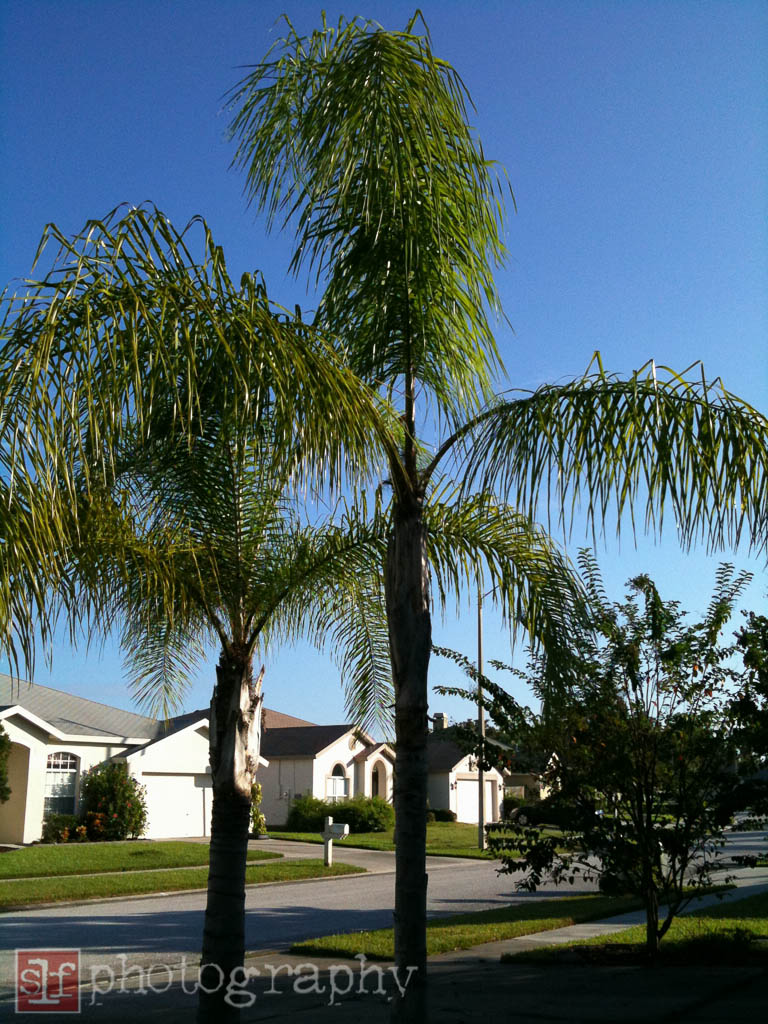
queen palms, 2009

queen palms, 2009

After they clean up the yard and get paid, I decide to check online about palm pruning. Yes, they did prune too much and it may hurt the tree. I am angry at myself for not insisting they do what I ask and not watching them. I will have to diligent if I ever let them trim again.

world backup day

Today is World Backup Day.

Everyday should be World Backup Day. If you aren't backing up your computer files, why? It is easy and necessary. Computers fail. Hard drives crash. Backups help.

One back is good. Two backups is better.

I use Apple Time Machine to back up my computer hard drive every hour. I use SuperDuper! to make a boot drive every night.

My music and movies are on a separate drive. I use SuperDuper! to make a back up every evening.

My photos are on another separate drive. I use SuperDuper! to make a back up every evening. I also backup my photos off-site using CrashPlan. Unlike my music and movies, I cannot get those photos back if they are lost.

What is you backup plan?

distracted

astonishing 1.PNG

I installed nvAlt and am working through my documents to save them in text format. Doing this has gotten me interested in writing more. Then I listened to Giant Size with Moises Chiullan and Merlin Mann. Merlin was speechless that John Gholson had not read Astonishing X-Men. I haven't read that series either. I went to Marvel and added Astonishing X-men to my queue. The series starts in 2004 and though it kills me to go back that far, I know it better to read from the beginning.

In less than a week, I was caught up to my current 2011 timeline. It helps that Astonishing X-men is not issued every month but about every three months. It doesn't tie into many of the major cross-over events but does allow for them.

Marvel Unlimited allows me to read all the Marvel comics I want for $9.99 a month. It is a great way to catch up with what is happening now.

With comics, many characters come and go, die and are revived again. It is worse than soap operas but much more colorful and fun.

moodymann

20140130 daarksky.PNG

I don't usually listen to podcasts during my morning walk. I want to go at a certain pace and podcasts tend to distract me. The weather today is crap and I am doing well going out to walk. I continued to listen to All Songs Considered. Today's mix is just that. Some electronic stuff, some dance, some hip hop, some old jazz. If I were at home, I might fast forward through some of the songs. This morning I was bundled up and too lazy to remove my gloves to get the iPhone out of my pocket. I listened to all the songs.
Sami Yenigun introduced Moodymann's Sunday Hotel. It has been over twenty years since I went to a disco. I am not one to listen to dance music. I found it to be the perfect beat for walking. It reminded me of Detroit and Chicago. I came home and purchased the track and added it to my walking playlist.

alley-oop

captain america first 13a.PNG

I was reading Captain America and The First Thirteen and Cap said "alley-oop" as he hopped out of his window. It got me thinking of where this phrase came from. Cap was in France during World War II so I thought maybe the phrase should actually be "allez-oop?" Aller is the French word for to go. The tenth Doctor Who is famous for saying "Allons y!" meaning "let's go!"

I checked online and found a couple different definitions. According to wordsmith.com 


interjection: Used as an exhortation or to signal the start of an activity. For example, when coordinating efforts to lift something heavy.
noun: A basketball move in which a player throws the ball to a teammate near the basket who leaps to catch it in mid-air and then puts it in the basket before returning to the floor.

The Oxford English Dictionary adds that alley-oop is a maneuver used in skateboarding or snowboarding spin usually involving an 180 degree or more turn.

entasis

From the Merriam-Webster Dictionary

Convex curve given to a column, spire, or similar upright member to avoid the optical illusion of hollowness or weakness that would arise from normal tapering. Exaggerated in Greek work of the Doric order, it grew more and more subtle in the 5th–4th century BC. Entasis is also occasionally found in Gothic spires and in smaller Romanesque columns.

Without adding the extra width to a column, they may appear skinny in the center. This happens more with taller columns. Thin columns do not look sturdy and able to hold up the weight above.

entasis.jpg

rss. a work still in progress

My rss client, FeedWrangler, stopped working on a Saturday morning. Interruptions have happened before. I assumed it would be corrected in a couple of hours. Towards evening, I went looking for some news of FeedWrangler. A few mentions on Twitter but nothing from @FeedWrangler nor its developer @_DavidSmith. I started to get concerned but hoped David Smith was at an all day event and could access his website.
By Sunday morning, I was frustrated. I subscribe to a lot of feeds. Too many feeds. I wasn't too worried about missing important news, but I didn't want my unread items piling up. I went to my feed reader apps and added my FeedBin credentials. I haven't used FeedBin in weeks. My unread count was near 10,000. Also, the feed list was different as I have deleted some and added others.
When GoogleReader was shutting down, I looked for a replacement. I first chose FeedBin. I signed up for FeedBin. It seemed OK but then one of favorite apps added FeedWrangler before FeedBin. I signed up for FeedWrangler. After going back and forth, I settled for FeedWrangler. FeedBin raised their prices, the went open source and I was glad for my choice for FeedWrangler. I knew I would get rid of FeedBin account when it came time for renewal. 
However, this weekend showed me that rss is still not stable and I should keep my options open. I should also keep a list of my feeds in a space I can access if the system goes down again.
FeedWrangler is back up. The developer was at a cabin without reception. It is good that it was fixed easily enough. Though I am now a bit doubtful that one person can handle this much responsibility. Where are the backup contingencies? What is something happened to the developer? None of us are invulnerable. 
It took a few days but I created a backup list of my feeds. I know I have an OPML file but that needs something to read it. I just wanted something for those temporary outages. As of Tuesday, I am halfway through the list. I am paring down the list as well. There are many feeds I only look at the headlines, some I keep because they followed me at some point. I have also found quite a few that have stopped posting. 

it is better to fade away...

Seems like the blogging fad is fading. Sure, everyone has a blog. But only a few post on a regular basis. Most of my friends have abandoned their blogs. I only post here sporadically. 

It is easier to post little snippets on twitter and Facebook and tumblr. 

A blog post should be a longer post. I formed thought. We think in 140 character thoughts.


lightroom quick start guide

Lightroom quick guide

I use Lightroom everyday so I know the program pretty well. But if you only open it every so often, you can forget how use the different modules. I met with a fellow photographer who needed a quick Lightroom refresh for a project he is working on. This is only meant as a refresher as there are much better resources for learning to use Lightroom.

Import

I import photos using a card reader and Lightroom. This keeps all my photos in one location. I keep them on an external hard drive. Open Lightroom. You will be in the Library Module. Click on Import.

I convert my raw files to dng. This is just an option. There is plenty of reasons to do it, and plenty not to waste the time.

I import my photographs into folders by date and use presets to apply meta data such as copyright and creator information. If I am importing a single event, I will apply location information as well.

Quick triage

My next step is to do a quick triage.

I look at photos in a the Loupe view at 100% and apply 1 star, 2 stars or reject. Photos get 2 stars if they are in focus, 1 star if they are off a bit and reject if the are out of focus.

I use my keyboard to apply these ratings. With the CAPS LOCK key on, Lightroom will move to the next photo when a rating is applied.

Once this is done, I delete all my rejected photos. I do not have unlimited drive space and do not need to keep photos I will never use.

As I scroll through, I apply keywords. I use keywords a lot. Many people do not use keywords. I find it is a great help when locating all photos of one of my boys. 

Create collection

I use Folders only to store my photos. I use Collections to sort my photos. I highlight all the photos I want and create a new collection. Just click on the + to the right of Collections Panel. 

Now I do a second triage. I look at photos that appear similar and decide which ones I want to develop. I delete the ones I do not want from the collection. Hitting the delete key will remove them from the collection but they will still be in the Lightroom catalog. To remove a photo from the Lightroom catalog, you need to be in the Folders Panel.

I mark the photos I want to develop with a 9 which is also the color blue.

Develop

Click D to move to the Develop Module.

Here is where I do cropping and straightening. I will adjust the white balance, exposure and remove clipped highlights as necessary.

At this point I will do specific adjustments using spot removal and the adjustment brush.

B&W

If I want to convert the photo to black & white, I will do this in the HSL / Color / B&W Panel. Click B&W and the photo will convert. At this point, you can do any adjust to specific color ways. Next I move to the Tone Curve Panel to bring out the highlights and deepen the blacks.

Presets

After using Lightroom for years, I have created my own presets. I apply one of those now. You can play with all the sliders in the Basic Panel and get the photo just the way you want it. You can also use one the Lightroom Presets as a starting point. If you find yourself applying the same adjustments, it is quick and easy to make your own Preset.

Sharpening & Noise reduction

I typically shoot with 100 iso so I rarely need noise reduction. Applying too much noise reduction and your photo will become too soft. Play around with the slider until you get something you like.

You need to be zoomed in 100% to be able to apply sharpening. There is no magic number for sharpening. You can play with the slider until you like what you see. I typically then move it the left just a bit. I think it is better to under sharpened than over sharpened.

If you have several photo which need the same adjustments but maybe not enough to create a preset, you can apply the same adjustments using sync. Click on the first photo in the Filmstrip on the bottom. Then go to the last photo you want to adjust and use shift-click to select them all. Click on Sync and choose which adjustments you want to apply. Click apply and watch the filmstrip make the adjustments.

At this point, I add a star and mark green (8) which tells me the photo is good to use.

I save 4 & 5 stars for really awesome shots or printed photographs

Export

Lightroom is unique in that none of what you just did has really been applied to the photo. That original photo is kept intact until you export the photo. I don't export for printing often. Mostly I export for web. Back in the Library Module, you can highlight the photos you want to export then click Export. There are some presets already there. You can use one as a starting point. Make the adjustment you need. Before you click Export, you can make a Preset of the options you just made by clicking Add at the bottom left of the Export Dialogue. I find this really helpful so I don't have to rethink each time I export images.